

You have organized your office, labeled your folders, and stored sensitive documents in your file cabinet, only to realize it is not locked or anchored. A loose file cabinet is not just a clutter risk; it is a danger to safety and privacy. Whether it holds employee records, financial data, or confidential client information, an unsecured cabinet can lead to tipping accidents, data breaches, or theft. Knowing how to secure a file cabinet properly protects both people and information. In this guide, you will learn how to lock, anchor, and safeguard your file cabinet against common risks using simple tools and proven methods. From choosing the right lock to earthquake-proofing in high-risk zones, these steps ensure your cabinet stays stable, closed, and secure.
Choose the Right Lock Type
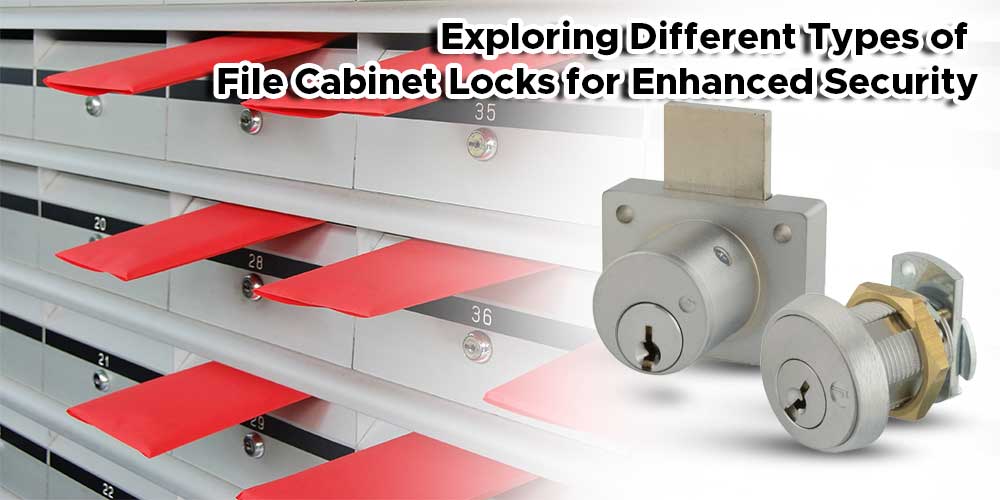
Securing a file cabinet starts with selecting the proper locking mechanism. Not all locks offer the same level of protection, and the best choice depends on your cabinet type, contents, and access needs.
Use Drawer Locks for Individual Access
Some cabinets allow each drawer to be locked separately. This is ideal when different people need access to different files. Keyed drawer locks are common, with each drawer requiring a unique key. For higher security, consider cam locks with removable keys. These locks only turn when the key is inserted, which prevents accidental unlocking.
Install Central Locking Systems
Many vertical and lateral file cabinets feature a central locking bar. When one drawer is locked, a metal rod engages and prevents other drawers from opening. This system streamlines access control and is commonly found in commercial offices. Make sure the locking bar moves freely and aligns correctly with each drawer latch.
Upgrade to Electronic or Combination Locks
For keyless convenience and audit trail capabilities, electronic keypad locks are a modern alternative. These locks let you set PIN codes for authorized users and are especially useful in shared environments. Some models even log access times. While more expensive, they eliminate lost keys and allow quick deactivation when someone leaves the organization.
Pro Tip: Avoid flimsy plastic locks or universal keys, which are common in low-cost cabinets. They are easy to pick or bypass with a shim.
Anchor the Cabinet to the Wall
A locked drawer will not help if the entire cabinet tips over. Anchoring prevents tip-overs caused by earthquakes, children, or accidental bumps. This step is especially critical in public or home offices.
Use Anti-Tip Brackets for Stability
Most safety standards recommend L-shaped anti-tip brackets. These brackets attach to the cabinet’s rear and anchor into wall studs. Install them near the top of the cabinet for maximum leverage. Always use #10 or #12 screws at least 1.5 inches long to ensure a strong hold.
Step-by-Step: Install an Anti-Tip Bracket
- Position the file cabinet in its final location.
- Mark the top back edge where the bracket will attach.
- Drill pilot holes into the cabinet’s metal frame.
- Secure the bracket to the cabinet using machine screws.
- Locate wall studs using a stud finder.
- Align the bracket’s wall plate with the stud and fasten securely.
Warning: Never anchor into drywall alone. Without a stud, the cabinet can still pull free during a tip event.
Check Clearance Before Installation
Ensure the cabinet can open fully after the bracket is installed. Some models extend the bracket arm too far, which limits drawer access. Test movement before final tightening.
Inspect Cabinet Condition Regularly
Even the best lock or anchor fails if the cabinet itself is damaged. Regular maintenance ensures your security measures remain effective.
Look for Worn Lock Mechanisms
Over time, repeated use can wear down lock pins or jam the central bar. Signs of wear include:
– Drawers that do not latch automatically
– Keys that stick or turn unevenly
– A locking bar that does not engage all drawers
Replace worn locks promptly. Most manufacturers offer replacement kits by model number.
Examine Drawer Rails and Alignment
Misaligned drawers can prevent the locking bar from engaging fully. If a drawer sticks or sags, clean the rails and lubricate with dry silicone spray. Avoid oil-based lubricants because they attract dust and worsen buildup.
Secure Sensitive Documents Beyond Locks

Locks and anchors protect against physical access and tipping, but extra steps are needed for high-confidentiality materials.
Use Lockable File Folders Inside Drawers
Even in a locked cabinet, sensitive files should be double-secured. Security file folders with built-in locks or zipper enclosures add a second barrier. These folders are ideal for personnel files, legal documents, or medical records.
Label Files Without Revealing Content
Avoid labeling folders with revealing titles like “Termination Records” or “Salary Details.” Use coded names or general categories such as “HR Q3” to reduce the incentive for unauthorized access.
Prevent Unauthorized Access
Controlling who can open the cabinet is as important as the lock itself.
Limit Key Distribution
Only issue cabinet keys to essential personnel. Keep a log of who has a key and when it was issued. When an employee leaves, rekey the cabinet or replace the lock to maintain control.
Consider Biometric Lock Upgrades
For high-security areas, biometric drawer locks that use fingerprints offer advanced protection. These locks eliminate key sharing and provide user-specific access. While more expensive, they are ideal for legal, medical, or financial offices.
Address Environmental Risks

Natural disasters or workplace conditions can compromise cabinet security, even if it is locked and anchored.
Earthquake-Proof in High-Risk Zones
In seismic areas, use heavy-duty anti-tip straps designed for earthquakes. These flexible steel cables attach from the cabinet to wall anchors and allow slight movement without detachment. Pair them with drawer stops that prevent drawers from flying open during shaking.
Protect Against Fire and Water
Store critical documents in fireproof and waterproof safes instead of standard cabinets. If you use a file cabinet, place it away from windows, pipes, or sprinkler systems to reduce water damage risk.
Follow OSHA and Safety Standards
Workplace safety regulations often require file cabinets to be anchored, especially in shared or public spaces.
Meet OSHA Tip-Over Guidelines
The Occupational Safety and Health Administration (OSHA) recommends anchoring all tall furniture, including file cabinets, to prevent injuries. While not always enforced for cabinets specifically, compliance reduces liability and promotes a safer workspace.
Comply with Industry-Specific Rules
Industries like healthcare (HIPAA) and finance (GLBA) require physical safeguards for records. An unanchored or unlocked cabinet could violate these rules during an audit. Document your security measures as part of compliance protocols.
Handle Cabinet Mobility Safely

Some file cabinets have casters for easy movement. While convenient, wheels can create hazards if not managed properly.
Lock Casters When Stationary
Ensure all swivel casters have locking mechanisms. Engage the locks whenever the cabinet is in use or storing sensitive materials. Test each wheel to confirm it will not roll.
Move Safely When Relocating
When moving a loaded cabinet:
– Empty drawers first to reduce weight
– Tilt slightly backward and roll gently
– Never drag or jerk, as this can damage casters or warp the frame
Note: Anchored cabinets should only be moved when necessary. Re-anchor immediately after relocation.
Frequently Asked Questions About Securing a File Cabinet
What is the best way to secure a file cabinet?
The best approach combines a quality lock with wall anchoring. Use a central locking system or cam locks for drawer security, and install an anti-tip bracket into wall studs to prevent tip-overs.
Can I anchor a file cabinet without drilling?
Yes, some adhesive or clamp-based anchors exist, but they are less reliable. For maximum safety, drilling into wall studs with screws is the recommended method.
How often should I inspect my file cabinet locks?
Inspect locks and drawer alignment every three to six months. Look for sticking keys, drawers that do not latch, or a locking bar that fails to engage all drawers.
Are electronic locks worth the cost?
Electronic locks are worth it for shared environments or high-security needs. They offer keyless access, audit trails, and quick deactivation when personnel change.
Do I need to anchor a small file cabinet?
Yes, even small cabinets can tip over when multiple top drawers are open. Anchoring is recommended for all file cabinets, regardless of size.
How do I rekey a file cabinet lock?
Rekeying requires a locksmith or a manufacturer replacement kit. Some cabinets allow you to remove the lock cylinder and replace the pins to match a new key.
Key Takeaways for Securing Your File Cabinet
Securing a file cabinet is not just about locking a drawer. It is a complete system of locks, anchors, access control, and maintenance. By choosing the right lock, anchoring to the wall, inspecting regularly, and protecting against environmental risks, you ensure both safety and confidentiality.
Whether in a home office or corporate environment, taking these steps reduces accidents, prevents data leaks, and keeps your space compliant with safety standards. Start today by checking your cabinet’s stability, testing the lock, and installing an anti-tip bracket if needed. A few minutes of effort can prevent serious harm.


