
If you’ve ever struggled to secure sensitive documents or found yourself juggling multiple keys for different file cabinets, you’re not alone. Choosing the right file cabinet lock can be confusing—especially with so many types, manufacturers, and compatibility issues. Whether you’re replacing a lost lock, upgrading security, or standardizing keys across an office, knowing the types of file cabinet locks available is essential.
From push-in plunger styles to cylinder replacements and universal kits, file cabinet locks vary by design, manufacturer, and keying options. This guide breaks down the most common types, how to identify them, and what to look for when buying a replacement or upgrade. You’ll also learn how to match locks across cabinets, decode key numbers, and avoid common fitting mistakes—especially with popular brands like HON, Global, and Chicago.
Let’s dive into the world of file cabinet locks so you can make a confident, informed decision.
HON F26 Push-In Locks (Plunger Style)
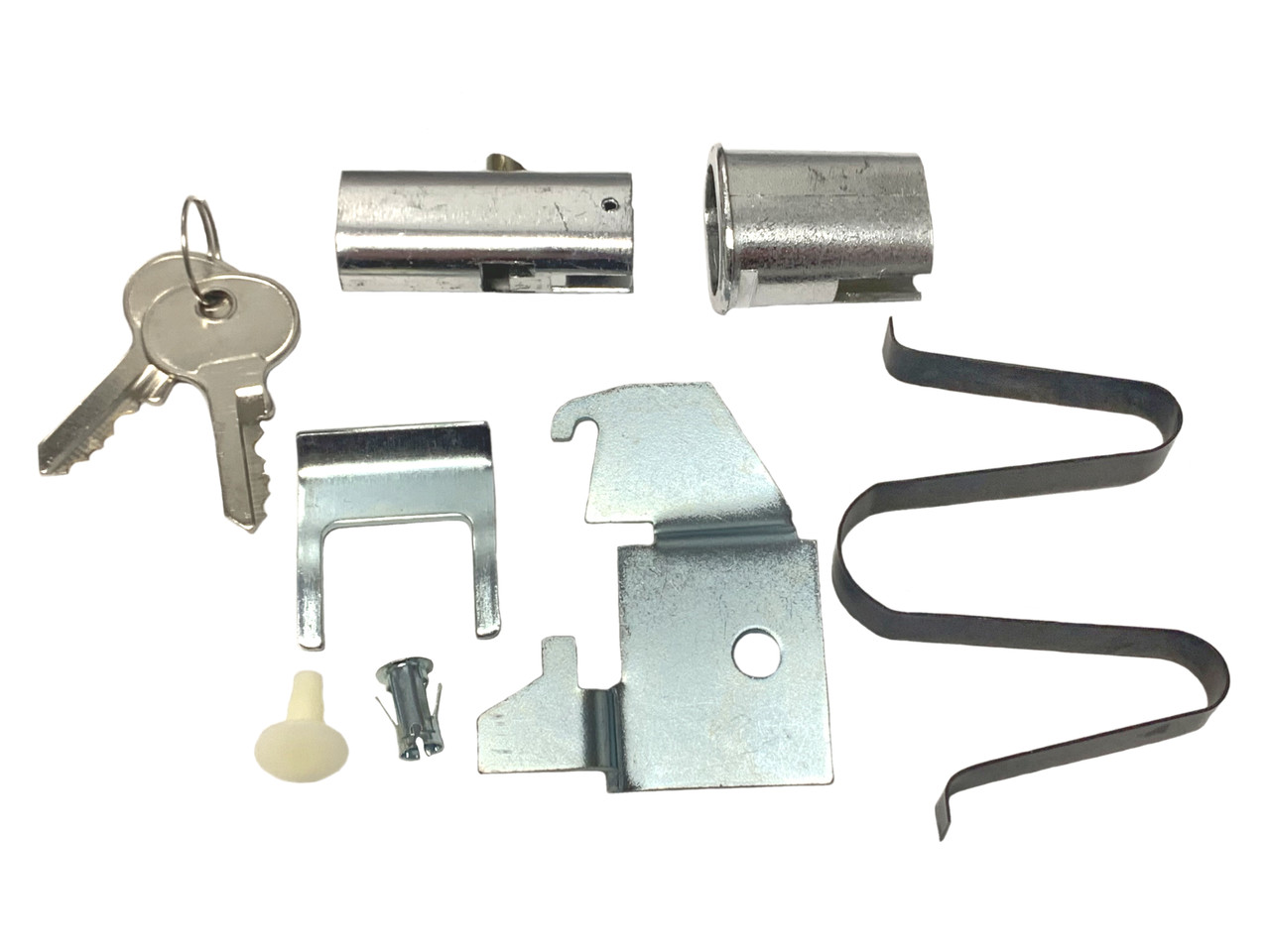
The F26-style lock is a classic push-in plunger mechanism commonly found on older HON vertical file cabinets. It’s simple: insert the key, turn it to unlock, then push the entire cylinder inward to engage or disengage the internal locking rod.
How F26 Locks Work
When you push the lock after unlocking, it activates a vertical rod that runs down the side of the cabinet, securing all drawers at once. This design is durable but requires proper alignment of the internal hardware. If your cabinet lacks the internal rod, the F26 kit won’t function unless paired with an external locking bar.
Identifying an F26 Lock
Look for:
– A round or slightly oval faceplate
– No visible screws on the lock face
– A smooth cylinder that moves inward when pressed
– Often labeled as “push-to-lock” or “plunger style”
These locks are sold as complete kits (like the SRS Hardware Model 2190), including the cylinder, faceplate, and internal linkage parts. Each kit typically comes with two keys and is supplied keyed different by default—meaning each lock uses a unique key.
Replacing or Matching F26 Locks
To replace:
1. Remove the old lock by unscrewing the retaining nut from behind the drawer front.
2. Compare dimensions with the new kit using installation PDFs.
3. Ensure your cabinet has the internal rod system—otherwise, consider an external solution.
For multiple cabinets to use the same key, order keyed alike (KA) versions. While F26 kits are often sold keyed different, some suppliers offer KA options upon request.
Pro Tip: If you have another working F26 cabinet, remove its lock and compare it visually to the product images before ordering.
HON F24/F28 Lever Handle Locks

The F24/F28 style is a more modern lever-based locking system used in newer HON vertical file cabinets. Instead of pushing the cylinder, these locks use a side-mounted lever arm that connects to the internal rod when turned.
Key Features of F24/F28 Locks
- Requires a key to rotate the cylinder and actuate the lever
- Includes an adapter plate for retrofitting older cabinets
- Typically includes two keys per kit
- Available keyed different or keyed alike
This system offers better leverage and smoother operation than the F26 plunger. The lock body is mounted behind the drawer front, with the lever arm engaging the vertical locking rod when turned.
Why the Adapter Plate Matters
Many F24/F28 kits include an adapter plate, allowing installation on legacy cabinets with slightly different knockout patterns. This makes the F24/F28 kit versatile for upgrades—even if your cabinet originally had an F26.
Warning: You cannot convert an F24/F28 cabinet to accept an F26 push-in lock—the mounting hole is larger for the F26, so there’s no safe way to retrofit without modification.
Choosing Keyed Alike vs. Keyed Different
Most F24/F28 kits (like SRS Models 2185 KA #1, #2, #5, #8, #10) are available keyed alike, meaning all locks operate with the same key. This is ideal for offices needing uniform access.
Each KA kit includes two identical keys. So, three KA locks = six matching keys. If you need more keys later, contact the supplier with the key number stamped on the original.
Global File Cabinet Lock Kits (LK26 Style)
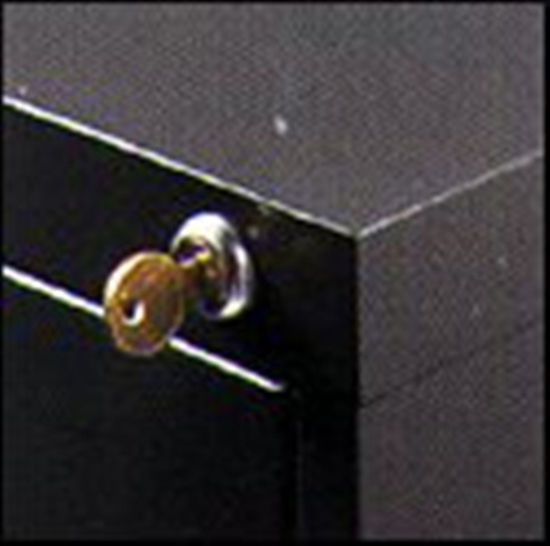
Global office furniture uses its own proprietary lock style known as the LK26. While similar in function to HON’s F26, it’s not interchangeable due to differences in mounting and internal linkage.
What Sets LK26 Locks Apart
- Designed specifically for Global brand vertical files
- Uses a push-in mechanism like the F26 but with unique dimensions
- Sold as complete kits (e.g., SRS Hardware Kit for Global LK26 KD)
- Supplied with two keys, usually keyed different
Like other systems, the LK26 connects to an internal rod that secures all drawers when engaged. Always verify compatibility using the manufacturer’s installation PDF.
Installation Tips for LK26
- Confirm your cabinet model accepts LK26-style hardware.
- Check if the internal rod is present and undamaged.
- Use the included instructions to align the linkage properly.
- Test before fully tightening screws.
Note: If your Global cabinet lacks internal rods, consider an external locking bar from brands like Abus or Major instead of a built-in kit.
Replacement Cylinder Locks (Chicago, Hudson, ESP)

Not all file cabinet locks require full kits. For many lateral or custom cabinets, you can replace just the cylinder—the part that accepts the key.
Common Replacement Lock Models
- Chicago 5001LP: Classic cylinder used in many commercial cabinets
- ESP PTR-1750S312 / 1750P312: Direct replacements for older HON models
- ESP Hudson FC103, FC5046: Machine-screw mounted, ideal for retrofitting
These are sold individually and often come keyed random (each lock has a unique key). Dimensions are critical—especially the “A dimension” (5/16″ for many ESP models).
Measuring for Cylinder Replacement
To find the right cylinder:
1. Remove the existing lock from the cabinet.
2. Measure:
– Overall length
– Faceplate diameter
– Projection from the faceplate
– “A dimension” (distance from center of keyhole to edge of cylinder)
3. Compare with specs on the product page.
Many ESP/Hudson models have downloadable PDFs with exact measurements and mounting details.
Expert Note: Some cylinders use standardized keyways. If you know the key code (number stamped near the keyhole), you may be able to order precut keys from Chicago, Hudson, or Anderson Hickey—even without the original lock.
Keying Options: Alike, Different, or Master Keyed?
Understanding keying options helps you manage access efficiently across multiple cabinets.
Keyed Different (KD) – Default Option
Each lock opens with a unique key. Best for:
– Individual department security
– Preventing cross-access
– Situations where each user needs private control
Most lock kits ship keyed different unless specified otherwise.
Keyed Alike (KA) – Same Key for All
All locks open with the same key. Ideal for:
– Open offices
– Shared departments
– Quick access during emergencies
Available for HON F24/F28 kits (e.g., KA #1, #2, #5, #8, #10). Just select the KA version when ordering.
Time-Saving Tip: Buy all KA locks at once to ensure they’re cut to the same key code. Mixing batches could result in mismatched keys.
Can You Get Master Keyed Systems?
While not commonly offered in standard kits, master keying is possible through specialized locksmith services. In a master system:
– Each cabinet has its own change key
– A single master key opens all
This requires custom ordering and higher costs—but useful for large organizations.
How to Identify Your Lock Type
Choosing the wrong lock is costly and time-consuming. Follow these steps to identify yours correctly.
Step 1: Check for Manufacturer and Model
Look for labels on:
– Cabinet back
– Drawer rails
– Inside drawer fronts
Knowing it’s a HON, Global, or Chicago cabinet narrows your options.
Step 2: Examine the Lock Face
Ask:
– Is it a push-in plunger (F26)?
– Does it have a lever arm (F24/F28)?
– Is it a standalone cylinder?
Take a photo and compare to product images online.
Step 3: Remove and Measure
If possible:
– Unscrew the lock from behind
– Measure critical dimensions
– Note any stamped numbers (key codes)
Compare with product spec sheets and PDF instructions.
Warning: An oval knockout doesn’t guarantee internal locking rods exist. Always inspect inside the cabinet.
Step 4: Use Installation PDFs
Downloadable installation instructions (available on most product pages) show:
– Exploded views
– Mounting templates
– Compatibility notes
They’re the best tool for confirming fit before purchase.
When Internal Locks Won’t Work: External Solutions
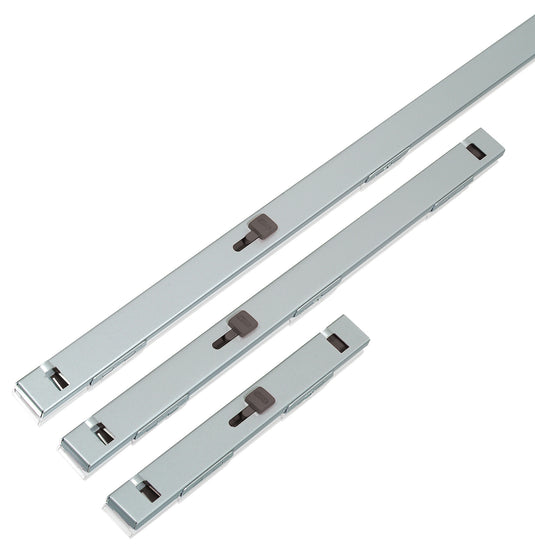
If your cabinet lacks internal rods or has been damaged, don’t give up. External locking bars provide strong, easy-to-install alternatives.
Top External Lock Brands
- Abus
- Major
These U-shaped bars slide over drawer pulls and lock with a padlock. No drilling or modifications needed.
Benefits of External Locks
- Universal fit
- Easy installation
- Removable for cleaning
- High security with hardened steel
Ideal for:
– Temporary security
– Cabinets with broken internal mechanisms
– Mixed-brand offices
Troubleshooting Common Lock Issues
Even the best lock can fail. Here’s how to fix common problems.
Lock Won’t Turn
Causes:
– Wrong key
– Debris in keyway
– Worn internal pins
Solutions:
– Try the second key
– Spray lock lubricant (not WD-40)
– Replace cylinder if worn
Push-In Lock Doesn’t Engage
Likely reasons:
– Internal rod misaligned
– Linkage disconnected
– Rod bent or obstructed
Fix:
1. Open all drawers.
2. Inspect linkage behind the lock.
3. Straighten or reconnect rods.
4. Test movement manually.
Key Number Doesn’t Match Replacement
Important: The number stamped on the lock face doesn’t always indicate the lock type. It may be:
– A key code
– A manufacturing batch number
– A model variant
Use it to request precut keys—but don’t assume it identifies the lock mechanism.
Check First: Visit manufacturer pages (Chicago, Hudson, Anderson Hickey) for key code lookup tools.
Buying Tips and Best Practices
Avoid frustration and wasted money with these expert tips.
Always Download Installation PDFs
Before buying any lock kit:
– Read the full instructions
– Check required tools
– Verify dimensions
– Confirm compatibility
Many returns happen because people skip this step.
Compare with Existing Cabinets
If other cabinets in your office work fine:
1. Remove a working lock.
2. Compare it side-by-side with product photos.
3. Match parts and dimensions exactly.
This is the fastest way to confirm compatibility.
Order All Locks at Once
For keyed alike setups:
– Buy all needed locks in a single order
– Ensure they’re cut to the same key
– Store spares in a secure location
Mixing orders risks getting mismatched keys—even if labeled KA.
Consider Future Maintenance
Choose brands with:
– Available replacement parts
– Standardized keyways
– Good documentation
HON, Global, and ESP Hudson are known for long-term support.
Frequently Asked Questions About File Cabinet Locks
How do I know which HON lock kit fits my cabinet?
Check the knockout dimensions listed on the product pages for F24/F28 and F26 style kits. Download the PDF installation instructions and compare them with your cabinet’s existing lock. If you have other cabinets in the office, compare the installed lock with the parts shown in the individual kits.
Can I convert a newer F24/F28 lock to the older push-in F26 style?
No. There is no adapter kit to accomplish this conversion. The hole size in the cabinet is larger for the push-in plunger style kit, so the F26 cannot be safely retrofitted into a cabinet designed for F24/F28.
How do I make multiple file cabinets use the same key?
Order locks that are keyed alike (KA). When you purchase locks of the same type, KA versions work with the same key. For example, ordering three KA locks gives you six identical keys (two per lock).
Does the number on my lock tell me what replacement to buy?
Not necessarily. The number stamped into the lock face by the keyhole does not always indicate the lock type. However, certain lock codes can be used to order precut keys from manufacturers like Chicago, Hudson, Anderson Hickey, and Timberline.
What if my cabinet has an oval knockout but no internal rods?
An oval metal knockout does not guarantee the cabinet has internal locking rod hardware. If rods are missing, a lock kit won’t work. In this case, consider an external locking bar from brands like Abus or Major.
Can I replace just the cylinder instead of the whole lock kit?
Yes. For many lateral or custom cabinets, you can replace only the cylinder. Measure your existing lock’s dimensions (including the “A dimension”) and compare with replacement cylinders from Chicago, ESP Hudson, or other manufacturers.
Key Takeaways for Choosing File Cabinet Locks
Knowing the types of file cabinet locks saves time, money, and headaches. Whether you’re using HON F26 plunger locks, F24/F28 lever kits, Global LK26 systems, or replacement cylinders from Chicago or Hudson, correct identification is key.
Start by examining your cabinet’s manufacturer label and lock face. Download installation PDFs before purchasing, measure carefully, and compare with working locks in your office. For streamlined access, choose keyed alike options when ordering multiple locks at once.
When internal locks fail or rods are missing, external locking bars from Abus or Major offer reliable backup. With this guide, you’re now equipped to choose, replace, and maintain any file cabinet lock confidently.